Sep 23 - Credit Card Reconciliation
Upload your credit card statement and Agave reads every line off it, works out whose card each charge belongs to, and matches what it can against the expenses your team already submitted. Month-end becomes a review of the exceptions instead of a line-by-line pass through the whole statement.
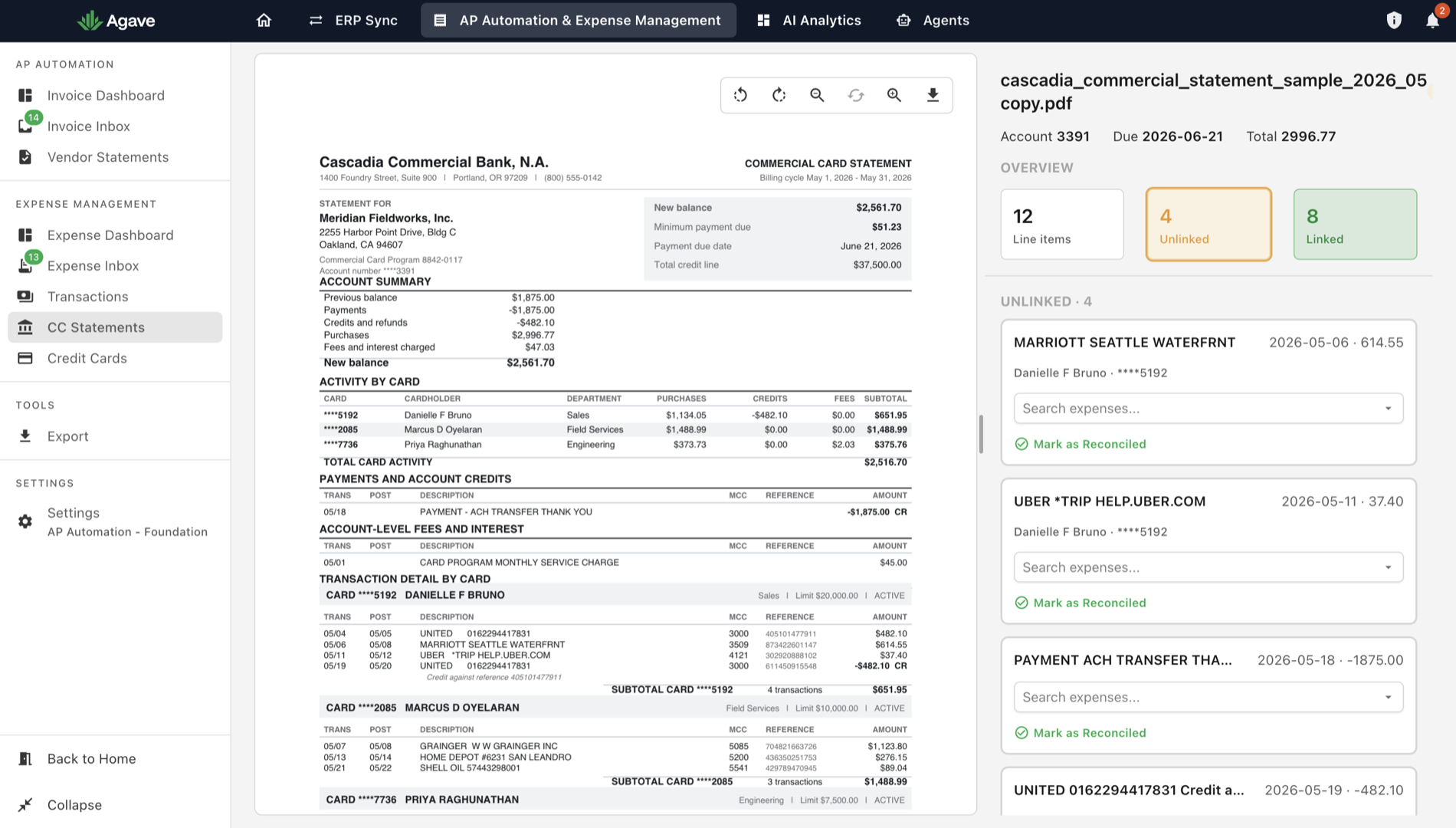
Reconciling a card statement means confirming that every charge on it has an expense behind it, then following up on the ones that do not. Done by hand that is a line-by-line comparison of the statement against your expense list, and the volume scales with your card program rather than with the number of problems in it. Agave now runs that comparison and hands back only the charges it could not match.
Reading the Statement
Upload the statement PDF and Agave extracts every transaction from it, however long the statement runs. A hundred pages of charges from a large card program is handled the same as a two-page statement. It then works out which cardholder each transaction belongs to, so charges are attributed to people rather than sitting in an undifferentiated list.
What Matches Automatically
A statement transaction is matched to an expense automatically when there is exactly one expense that has the same amount and the same date, and that expense belongs to the cardholder the transaction belongs to.
The rule is deliberately strict. Agave will not guess between two plausible candidates: if more than one expense could be the match, or if the closest one is a few days out, nothing is matched automatically and the transaction stays unlinked. An expense already matched to another transaction is never matched a second time.
Clearing What Is Left
A statement opens with its counts: how many line items it holds, how many are Linked to an expense, and how many are still Unlinked. The unlinked ones are the work, and the count falls as you clear them.
Each unlinked charge shows the merchant, the date, the amount, and the cardholder it belongs to. Use Search expenses to attach the right expense, or Mark as Reconciled when the charge is accounted for in a way Agave cannot see. A link that turns out to be wrong can be undone, and anything you clear can be reopened.
Most of what stays unlinked is a charge nobody submitted a receipt for, which is the finding you wanted the reconciliation for in the first place. The statement is done once nothing on it is still unlinked.
Availability
Credit Card Reconciliation is an admin tool and is gated behind a feature flag. Talk to your account manager about switching it on.