Agave AP Automation creates AP invoices through Spectrum's Vendor Invoice web service. Invoices land unposted, so your team can still review and post them in Spectrum. If your Spectrum company routes invoices for approval, they go to approval first.
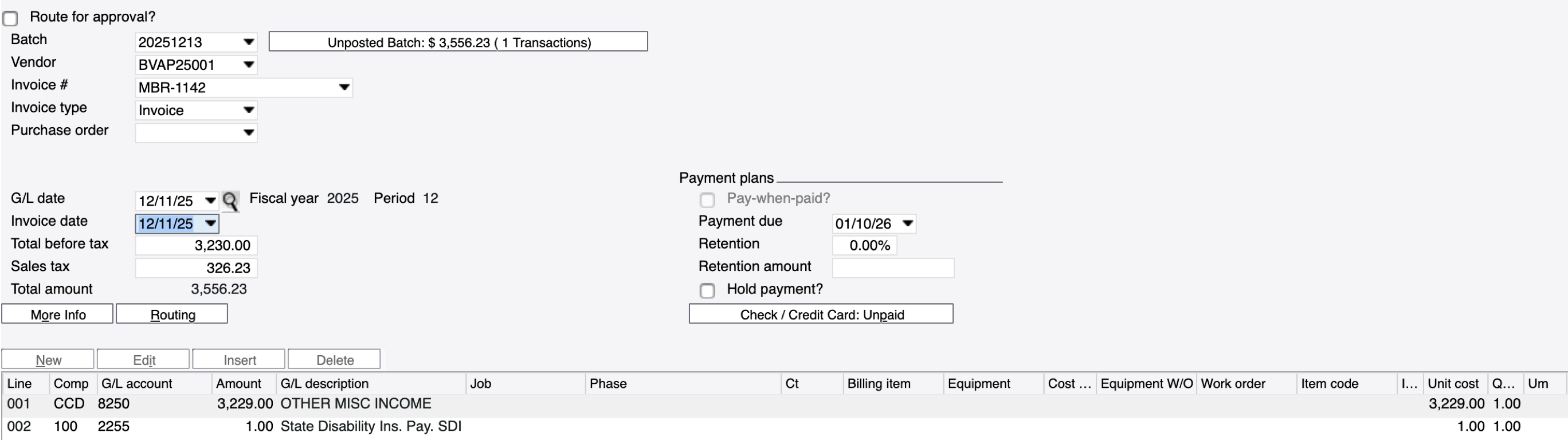
Hover over a field on Spectrum's Vendor Invoice Entry screen to see what Agave writes:
Written
Written with a setting
Not written
Written
#
Spectrum field
Agave field
Notes
1
Batch
Set by Agave
The week-ending date of the invoice date, like 20251213.
2
Vendor
Vendor
3
Invoice #
Invoice number
4
Invoice type
Set by Agave
Invoice, or Credit memo when the total is negative.
6
G/L date
GL posting date
The invoice date, or the sync date by setting.
7
Invoice date
Invoice date
8
Total before tax
Subtotal
Before tax. The lines add up to it.
9
Sales tax
Tax amount
All tax goes here. Agave never adds a tax line.
10
Payment due
Due date
From the vendor's terms, else the invoice date.
12
Retention amount
Retainage amount
15
G/L account
GL account
From the line, else the cost type's G/L account.
16
Amount
Amount
Before tax.
17
Job
Project
18
Phase
Cost code
19
Ct
Cost type
25
Unit cost
Unit cost
26
Quantity
Quantity
Remark (lines)
Description
Cost center (lines)
Department
Written with a setting
#
Spectrum field
Agave field
Notes
5
Purchase order / Subcontract
Commitment
Subcontracts when the invoice is matched to one. POs only with a setting.
14
Check / Credit Card
Check / Credit Card
Marked paid only for vendors listed in a setting.
20
Billing item
Subcontract line
Subcontract invoices only.
21
Equipment
Equipment
Optional setting.
22
Cost category
Cost type
Equipment lines only.
24
Item code
PO line
PO invoices only, with a setting.
27
Um
Unit of measure
From the subcontract or PO line.
Tax code (lines)
Tax code (lines)
Optional setting.
Not written
#
Spectrum field
Notes
11
Retention
Agave sends the retention amount instead.
13
Hold payment?
23
Work order
Tax type and tax amount (lines)
Tax is sent once on the header.
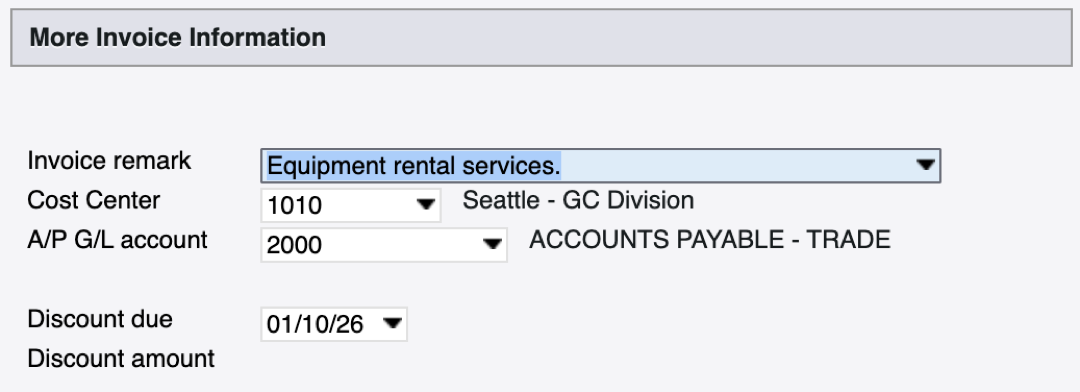
The More Info button opens this window:
Written
Written with a setting
Not written
Written
#
Spectrum field
Agave field
Notes
1
Invoice remark
Description
2
Cost Center
Department
From the invoice, or the job's cost center by setting.