Agave AP Automation creates invoices in one of two places in Sage Intacct:
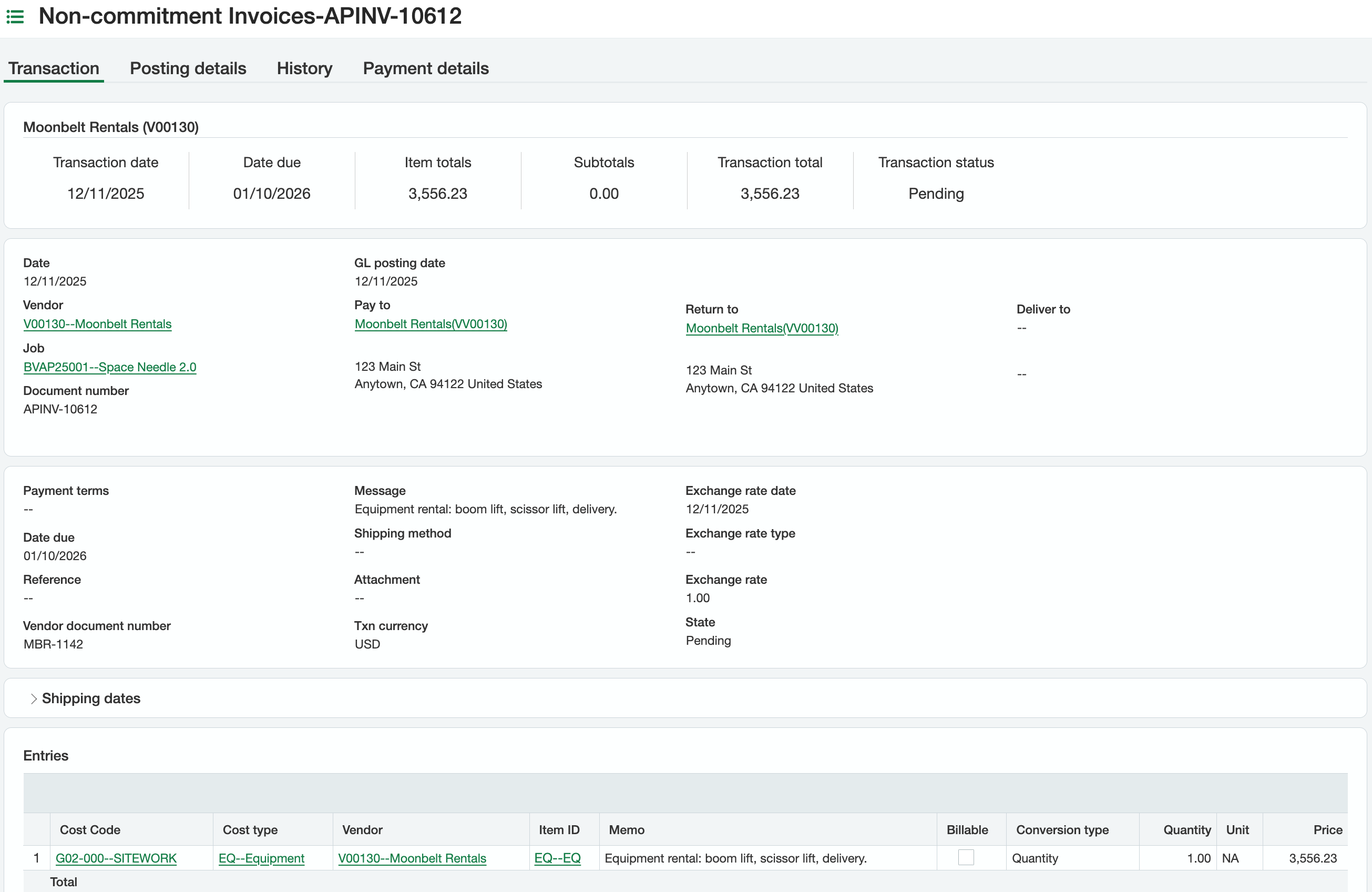
Purchasing transactions, for invoices with a project or a commitment. They land Pending, so your team can still review and post them. Committed invoices are converted from the PO or subcontract.
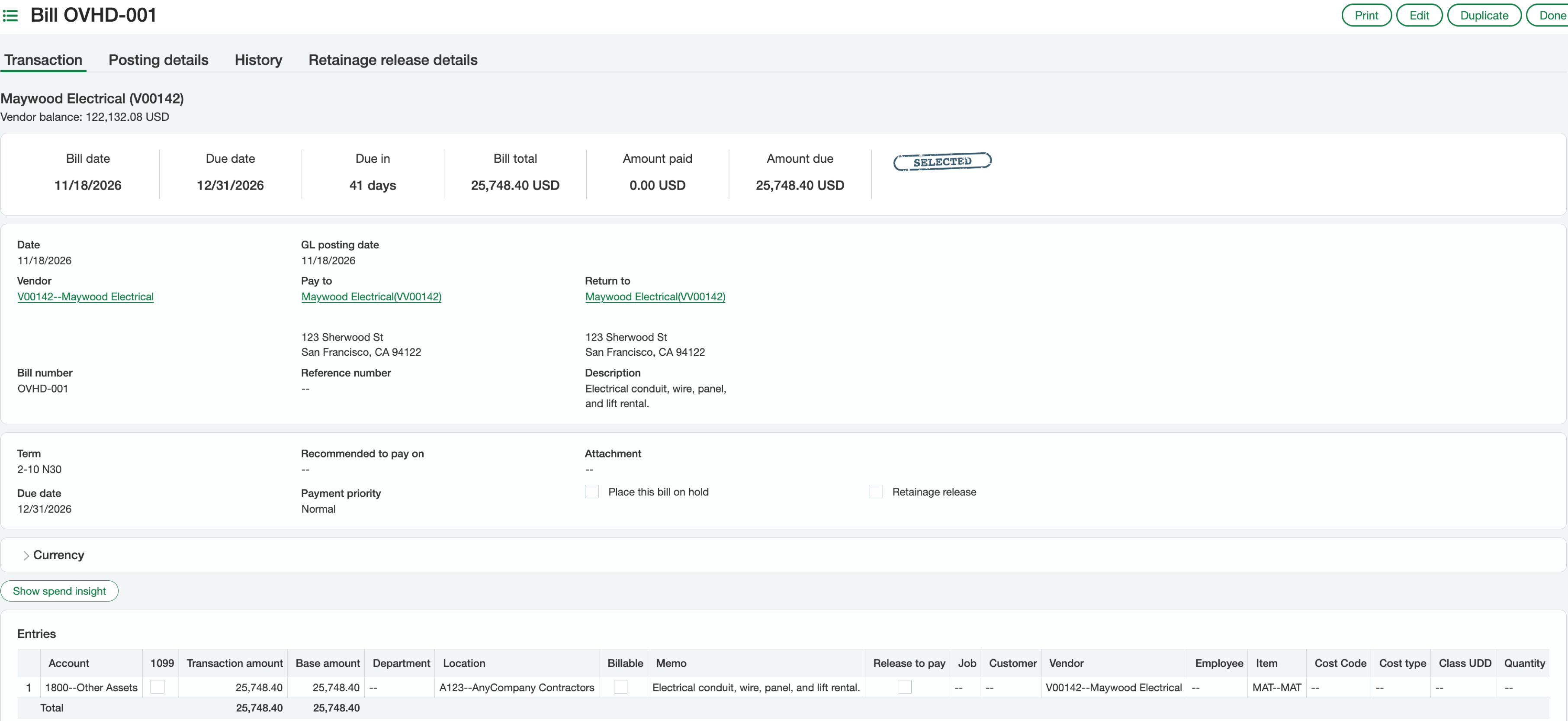
AP bills, for overhead invoices with no project and no commitment. Agave submits them, so they follow your Intacct approval setup.
Hover over a field on a Purchasing transaction to see what Agave writes:
Written
Written with a setting
Not written
Written
#
Intacct field
Agave field
Notes
1
Transaction type
Set by Agave
From your settings: one type each for PO invoices, subcontract invoices and invoices with no commitment.
2
Date
Invoice date
3
GL posting date
GL posting date
4
Vendor
Vendor
8
Job
Project
The sub job when every line shares one.
11
Date due
Due date
13
Vendor document number
Invoice number
14
Message
Description
19
State
Set by Agave
Always Pending, so your team can review and post it in Intacct.
20
Cost Code
Cost code
21
Cost type
Cost type
22
Vendor (lines)
Set by Agave
Always the invoice vendor.
23
Item ID
Item
Comes from the cost type.
24
Memo
Description
26
Quantity
Quantity
27
Unit
Unit of measure
28
Price
Unit cost
Intacct works out the line amount from quantity and price.
Job (lines)
Project
The line's sub job, else the line or invoice project.
Department (lines)
Department
Written with a setting
#
Intacct field
Agave field
Notes
10
Payment terms
Payment terms
The vendor's default terms, only when the invoice has no due date.
16
Attachment
Invoice file
Only when an attachments folder is set up for your Intacct connection.
25
Billable
Billable
Optional setting. Also writes the project's customer.
Amount retained (lines)
Retainage amount
Header retainage is split across the lines by amount.
Location (lines)
Location (lines)
The project's location, when you're connected at the top-level entity or by setting.
Converted from (lines)
Commitment line
Committed invoices only. Each line is converted from its PO or subcontract line.
Not written
#
Intacct field
Notes
5
Pay to
Intacct fills it from the vendor.
6
Return to
Intacct fills it from the vendor.
7
Deliver to
9
Document number
Numbered by Intacct.
12
Reference
15
Shipping method
17
Txn currency
18
Exchange rate fields
GL account (lines)
Intacct takes it from the item.
Overhead invoices go to an AP bill instead:
Written
Written with a setting
Not written
Written
#
Intacct field
Agave field
Notes
1
Date
Invoice date
2
GL posting date
GL posting date
3
Vendor
Vendor
6
Bill number
Invoice number
8
Description
Description
10
Due date
Due date
16
Account
GL account
17
Transaction amount
Amount
18
Department
Department
21
Memo
Description
24
Vendor (lines)
Set by Agave
Always the invoice vendor.
Written with a setting
#
Intacct field
Agave field
Notes
9
Term
Payment terms
The vendor's default terms, only when the invoice has no due date.
13
Attachment
Invoice file
Only when an attachments folder is set up for your Intacct connection.
20
Billable
Billable
Optional setting.
23
Customer
Customer
Only on billable lines.
25
Item
Item
Only when the line has an item.
Not written
#
Intacct field
Notes
4
Pay to
Intacct fills it from the vendor.
5
Return to
Intacct fills it from the vendor.
7
Reference number
11
Recommended to pay on
12
Payment priority
14
Place this bill on hold
15
Retainage release
19
Location
Intacct fills it from your entity.
22
Job
Bills never carry a job. Invoices with a project become Purchasing transactions.
Transaction types. Agave picks the Purchasing transaction type from your settings, one each for PO invoices, subcontract invoices and invoices with no commitment.
Tax and freight go in as their own lines, or are spread across lines by setting.
Attachments need an attachments folder set up for your Intacct connection.
Create only. Changes after sync are made in Intacct.
Need another field? Ask your Agave contact about custom field mapping.