AP Invoices in Foundation
Agave AP Automation creates AP invoices in Foundation through Foundation's FSI Importer. Invoices land as unposted transactions in A/P Invoice Entry, so your team can still review and post them in Foundation.
Hover over a field on Foundation's A/P Invoice Entry screen to see what Agave writes:
- Written
- Written with a setting
- Not written
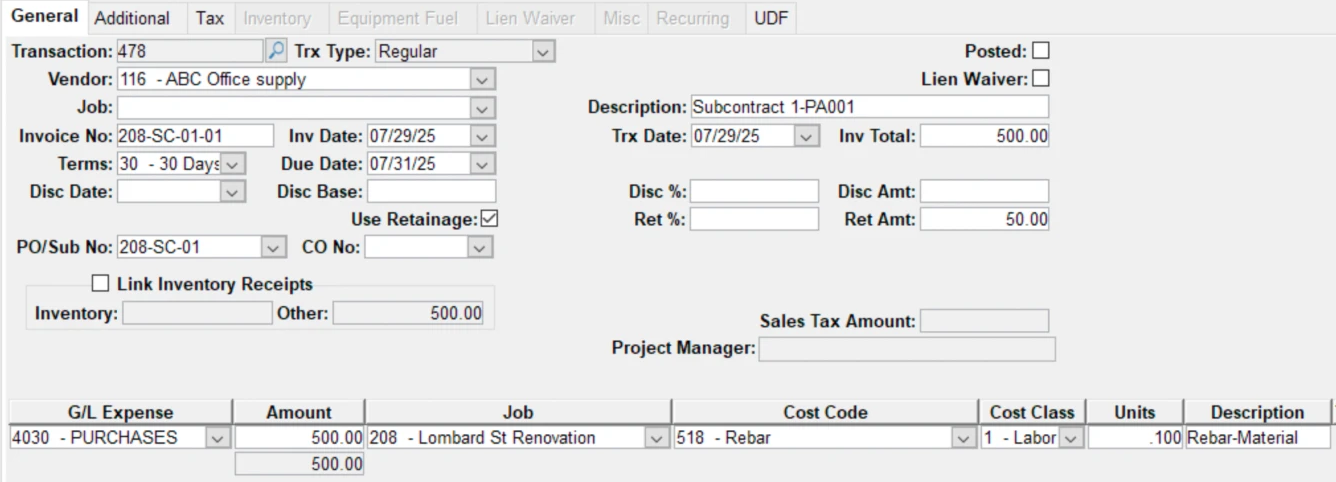
Written
| # | Foundation field | Agave field | Notes |
|---|---|---|---|
| 1 | Trx Type | Type | Set automatically: Regular, Credit when the total is negative, or Prepaid. |
| 2 | Vendor | Vendor | |
| 3 | Job | Project | Copied to every line unless a line has its own job. |
| 4 | Invoice No | Invoice number | |
| 5 | Inv Date | Invoice date | |
| 6 | Terms | Terms | From the vendor record. |
| 7 | Due Date | Due Date | From the vendor's terms. |
| 8 | Disc Date | Discount date | |
| 10 | PO/Sub No | Commitment (PO or subcontract) | Header only. Lines aren't tied to commitment lines. |
| 14 | Description | Description | Up to 30 characters. |
| 15 | Trx Date | GL posting date | The invoice date, or the sync date by setting. |
| 16 | Inv Total | Invoice total | Always the sum of the lines. |
| 18 | Disc Amt | Discount amount | |
| 20 | Ret Amt | Retainage amount | Header only. Retainage is not written on lines. |
| 22 | G/L Expense | GL account | From the line, else the commitment line, else the cost class default. |
| 23 | Amount | Amount | |
| 24 | Job (lines) | Project | The header job, or a job per line by setting. |
| 25 | Cost Code | Cost Code | |
| 26 | Cost Class | Cost type | |
| 27 | Units | Quantity | |
| 28 | Description (lines) | Description |
Written with a setting
| # | Foundation field | Agave field | Notes |
|---|---|---|---|
| 13 | Lien Waiver | Lien Waiver | Set by a setting: the A/P Control default, always on, always off, or from the commitment. |
| Phase | Phase | Only when phases are turned on in Foundation. | |
| Division 1 | Division | Optional setting, on each line. Can't be used with a job. | |
| Prepaid payment fields | Payment type, check number, amount, date | Only on prepaid invoices, an optional setting. |
Not written
| # | Foundation field | Notes |
|---|---|---|
| 9 | Disc Base | |
| 11 | CO No | |
| 12 | Inventory | Every line goes in as a regular line. No inventory lines or linked inventory receipts. |
| 17 | Disc % | Agave sends the discount amount instead. |
| 19 | Ret % | Agave sends the retainage amount instead. |
| 21 | Sales Tax Amount | Tax goes in as its own line, or spread across lines by setting. |
| Line tax columns (Tax, Tax Base, TaxAuthority, Tax Rate) | Tax goes in as its own line, or spread across lines by setting. |
Good to know
- Agave Connector. It must be running on your Foundation machine, with the FSI Importer installed.
- Tax and freight go in as their own lines, or are spread across lines by setting.
- Use tax is an optional setting. Agave writes an expense line plus an offsetting accrual line.
- Document link. The invoice is linked on the Additional tab. With an attachment folder on your Foundation machine it's the PDF itself; without one it's a link back to the invoice in Agave.
- Create only. Changes after sync are made in Foundation.
- Need another field? Ask your Agave contact about custom field mapping.