AP Invoices in Vista
Agave AP Automation adds AP invoices to a pending batch in Vista's AP Transaction Entry, so your team can still validate and post the batch in Vista.
Hover over a field on Vista's AP Transaction Entry screen to see what Agave writes:
- Written
- Written with a setting
- Not written
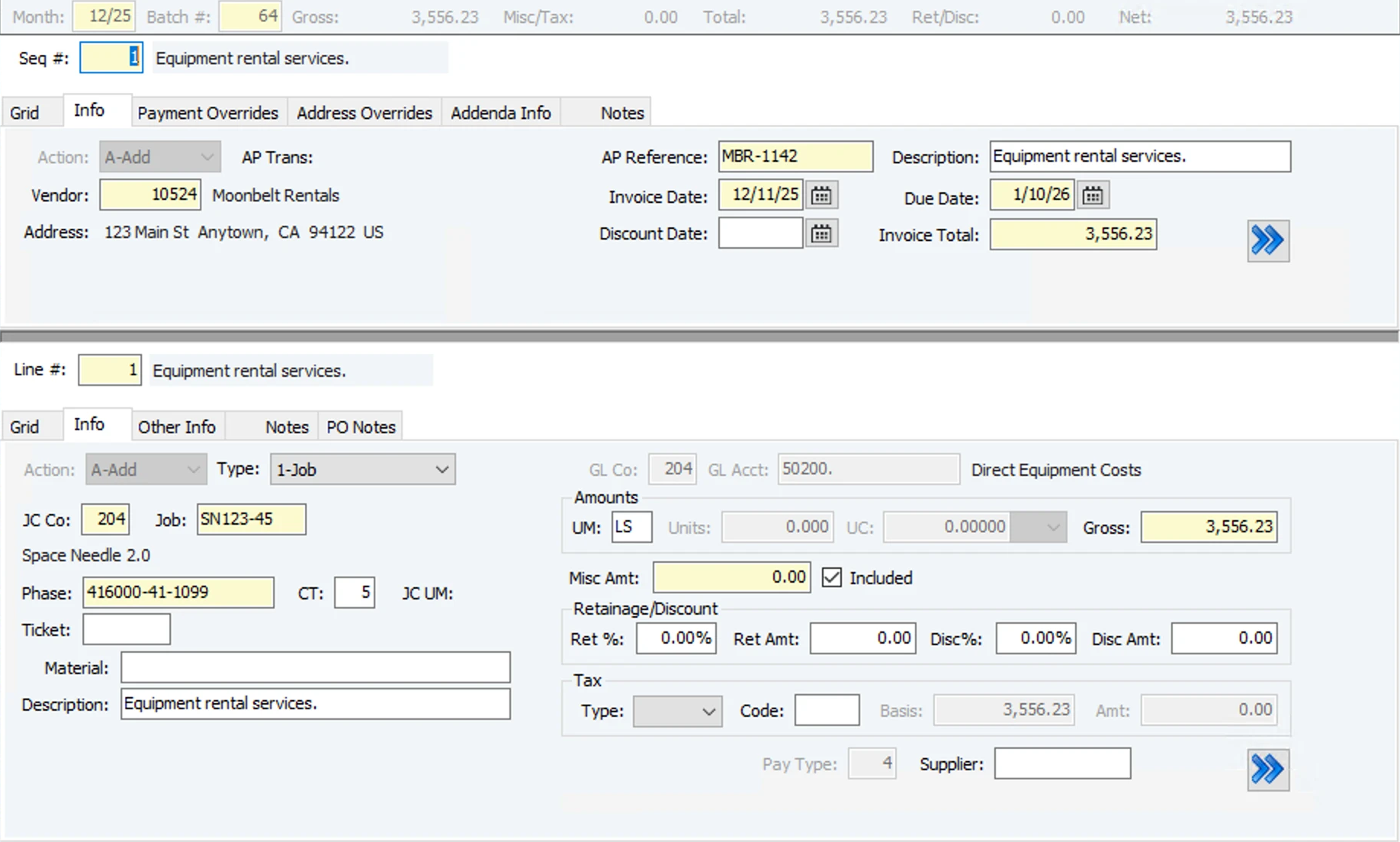
Written
| # | Vista field | Agave field | Notes |
|---|---|---|---|
| 1 | Month | Set by Agave | The invoice date's month, or the first open month when that one is closed. A setting can always use the first open month. |
| 2 | Batch # | Set by Agave | A new batch per invoice, or the day's open Agave batch by setting. |
| 3 | Seq # | Set by Agave | |
| 5 | Vendor | Vendor | |
| 6 | AP Reference | Invoice number | |
| 7 | Invoice Date | Invoice Date | |
| 8 | Discount Date | Discount Date | |
| 9 | Description | Description | |
| 10 | Due Date | Due Date | From the vendor's terms when blank, else the invoice date. |
| 11 | Invoice Total | Invoice Total | The sum of the line amounts plus line tax. |
| 12 | Type | Line type | Set automatically: Subcontract, PO, Equipment, Job, or Expense when there is no project. |
| 13 | JC Co | Set by Agave | |
| 14 | Job | Project | |
| 15 | Phase | Cost code | |
| 16 | CT | Cost type | |
| 19 | Description (lines) | Description | |
| 20 | GL Acct | GL account | From the line, else Vista's default for the job, phase and cost type. |
| 21 | UM | Unit of measure | From the line or the job budget, else a default you set (LS out of the box). |
| 22 | Units | Quantity | 0 on LS lines. |
| 23 | UC | Unit cost | 0 on LS lines. |
| 24 | Gross | Amount | |
| 27 | Ret Amt | Retainage amount | Header retainage is split across the lines by amount. |
| 29 | Disc Amt | Discount amount | Header discount is split across the lines by amount. |
| 31 | Tax Amt | Tax amount | The line tax amount, or 0. |
| 32 | Pay Type | Set by Agave | From your AP company setup. |
Written with a setting
| # | Vista field | Agave field | Notes |
|---|---|---|---|
| 18 | Material | Item | Only when the line has an item. |
| 30 | Tax Type, Code and Basis | Tax code | Only when the line has a tax code. Sales tax by default. |
| 33 | Supplier | Line vendor | |
| Subcontract lines | Commitment line | Job, phase, cost type and UM come from the subcontract item. | |
| PO lines | Commitment line | Job coding, UM and material come from the PO line. | |
| Equipment lines | Equipment | Optional setting. The GL account comes from the equipment's EM department. |
Not written
| # | Vista field | Notes |
|---|---|---|
| 4 | Payment Overrides | Pay method, cash account and 1099 info come from the vendor and AP company setup. |
| 17 | Ticket | |
| 25 | Misc Amt | Always 0. |
| 26 | Ret % | Agave sends the retainage amount instead. |
| 28 | Disc% | Agave sends the discount amount instead. |
| Use tax | ||
| Inventory, EM work order and SM work order lines | ||
| Prepaid invoices |
Good to know
- Vista checks first. Agave runs Vista's own validation before saving, so Vista errors show up in Agave.
- Tax and freight go in as their own lines, or are spread across lines by setting.
- Attachments. The invoice PDF is saved as a Vista attachment and carries over when the batch is posted.
- All or nothing. Header, lines and files are saved together. If anything fails, nothing is left in Vista.
- Create only. Changes after sync are made in Vista.
- Need another field? Ask your Agave contact about custom field mapping.